Skip to content
shadw
ProductSolutionsDocsPricing
Sign inGet started
shadw

Push to Git.
Get a live URL.

Deploy functions, containers and static sites from Git, a zip upload or a container image, with managed databases beside them. Every pull request on a connected GitHub repository gets a live preview.

Start building Read the docs Watch the demo (opens YouTube in a new tab)
Pixel-aligned animated globe wireframe The original transparent globe artwork is preserved unchanged. Blue luminous sweep segments travel directly along the exact blue globe routes. />
$ shadw deploy https://github.com/you/my-app \
--project my-app --follow
Deploy started: build dpl-3f9a21c07b (project my-app)
Stream logs: shadw build logs dpl-3f9a21c07b --follow
Cloning github.com/you/my-app (Branch: main, Commit: HEAD)
Detected framework: Next.js — primitive: Hybrid, package manager: npm (NpmLock)
…
Uploading build outputs…
Build dpl-3f9a21c07b → ready
$ shadw deploy https://github.com/you/my-app \
--project my-app --follow
Deploy started: build dpl-3f9a21c07b (project my-app)
Stream logs: shadw build logs dpl-3f9a21c07b --follow
Cloning github.com/you/my-app (Branch: main, Commit: HEAD)
Detected framework: Next.js — primitive: Hybrid, package manager: npm (NpmLock)
…
Uploading build outputs…
Build dpl-3f9a21c07b → ready
my-app.shadw.app
Ready Building
Own Your CloudOwn Your CloudOwn Your CloudOwn Your CloudOwn Your CloudOwn Your CloudOwn Your CloudOwn Your CloudOwn Your CloudOwn Your CloudOwn Your CloudOwn Your Cloud

Bring what you already build

Detects your framework. Runs a litebox isolate.

  • Next.js
  • Nuxt
  • SvelteKit
  • Astro
  • Vite
  • Vue CLI
  • Create React App
  • Node.js
  • Docker

Builds with npm · pnpm · yarn · bun, or from a Dockerfile

How it works

No pipeline to assemble.

Connect a repository and the platform builds it, gives it an address and lets you roll back to an earlier deployment.

  1. mainfeature/pricing
    01

    Connect your code

    Push to Git, upload a zip or point at a container image. A push starts a build.

  2. Cloning repository
    Detected Next.js
    Uploading outputs…
    02

    Build it

    A build runs on a machine that has the toolchain it needs. A failed build keeps its project and its logs, so you can fix it and redeploy.

  3. my-app.shadw.app
    Ready
    03

    Go live

    Every deployment gets its own HTTPS address. Pull requests on a connected GitHub repository get previews, and an earlier deployment can be promoted to production.

What you get

Everything between git push and a live URL.

Builds, previews, domains, data and logs in one platform.

Own your cloud

Use the hosted platform, or run shadw on machines you operate.

#128Add pricing pageReady
#127Fix redirectBuilding
#126Bump packagesMerged

A live URL for every pull request

Each pull request on a connected GitHub repository gets its own preview, kept apart from production until you merge it or promote it.

IdleWakes on request

Previews that sleep

Production stays warm. Previews and earlier deployments scale to zero when idle and wake on the next request.

A@✓
CNAMEwww✓
TXT_hive-verify✓

Domains, DNS and TLS

Attach a custom domain, manage its DNS records and get HTTPS certificates, from the dashboard or the CLI.

PostgresRedisSQLiteBlobQueueVectorPub/SubRealtime

Managed data

Provision Postgres, Redis, SQLite, queues, blobs, vectors, pub/sub and realtime channels from the same dashboard.

dpl-3f9a21c07bProduction
dpl-b7d10e44a2Promote
dpl-91c3f0a85ePromote

Promote an earlier deployment

When a release goes wrong, promote an earlier deployment back to production.

info Build started
info Detected Next.js
info Uploading build outputs…
readyDeployment ready

Logs and metrics

Build and runtime logs, and metrics polled from the dashboard, in one place.

The dashboard

Every project, build and preview in one place.

Projects, deployments, logs, domains and usage, in the same dashboard you deploy from.
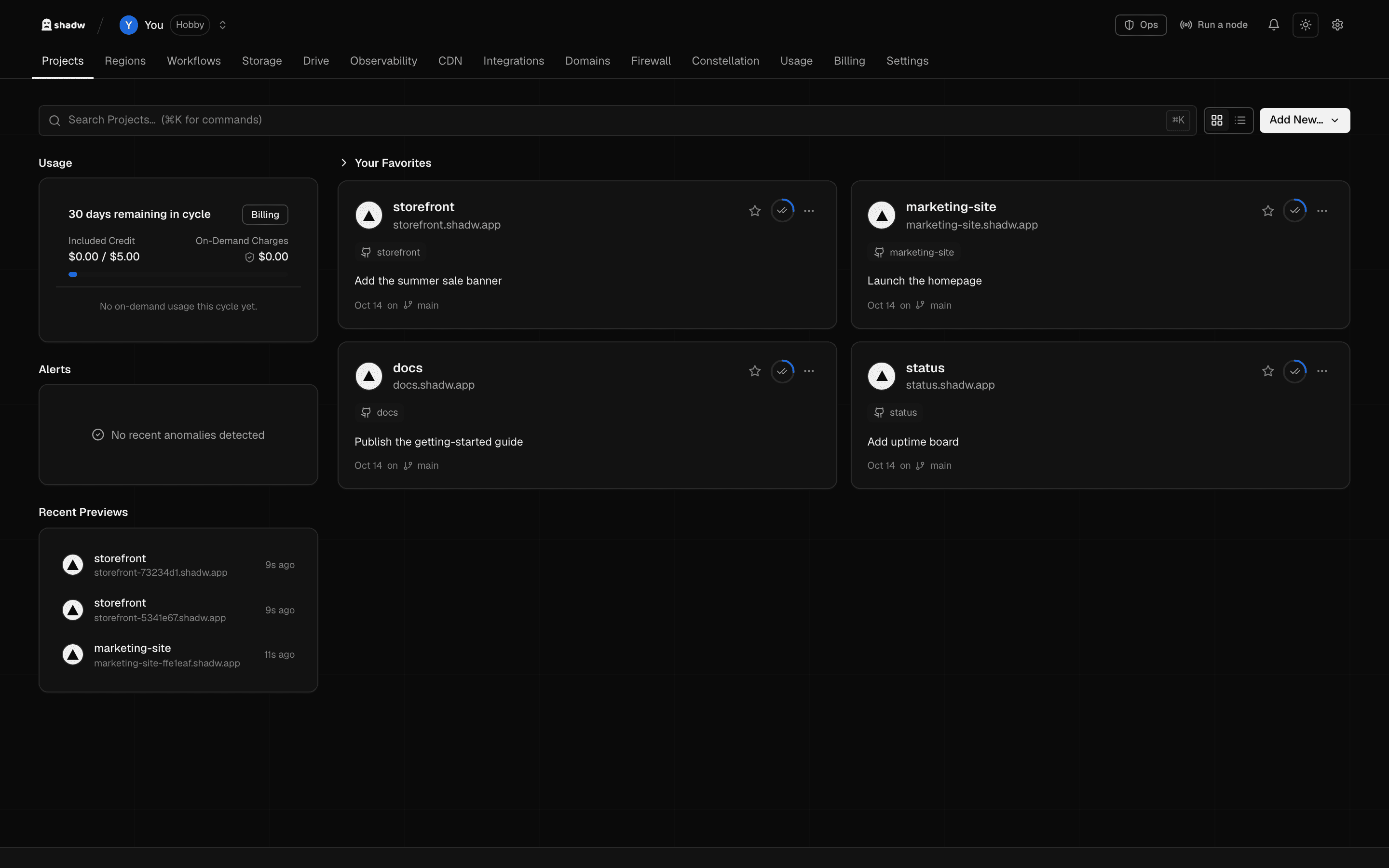
The shadw dashboard on a local machine with four sample projects, storefront, marketing-site, docs and status, each deployed, with recent previews and usage beside them.
A project's Deployments tab: one production deployment and two previews, all ready.
The shadw dashboard on a local machine with four sample projects, storefront, marketing-site, docs and status, each deployed, with recent previews and usage beside them.

For developers and agents

One API for you, your CI and your agents.

The CLI and the REST API use the same API keys, so a script, a CI job or an agent deploys the same way you do.

  • API keys bound to a team, the same for the CLI and the REST API
  • Push to deploy from GitHub, or deploy from a URL, a zip or an image
  • Follow a build's logs from the terminal with --follow
Getting started guide
# Authenticate once with an API key
$ shadw auth login --token <your-api-key>
 
# Deploy a repository and follow the build
$ shadw deploy https://github.com/you/my-app \
--project my-app --follow
 
# Re-attach to a build's logs, or rebuild a project
$ shadw build logs dpl-3f9a21c07b --follow
$ shadw projects redeploy my-app

Under the hood

Built like infrastructure.

How deployments are signed, secrets are sealed and access is gated.

  • Private previews

    Previews are reachable only by your team by default.

  • Signed deployments

    Each deployment carries an integrity chain signed with an ed25519 key.

  • Encrypted secrets

    Sensitive variables are sealed with ChaCha20-Poly1305 before they touch disk.

  • Team roles

    Teams have owner, admin, member and viewer roles.

Start with one repository.

Sign up, connect a repository and watch the first build run. The rest is the same workflow, repeated.

Start building Getting started
shadw
shadw

Serverless functions and containers deployed from Git, plus managed data.

Product
  • Overview
  • Features
  • Solutions
  • Pricing
Resources
  • Documentation
  • API reference
  • Getting started
  • Status
Company
  • Contact
  • Privacy
© 2026 shadw. All rights reserved.